
Course · UBOS AI Academy
Knowledge Management with Agentic AI
From conversation to reliable requirements
A practical 90-minute course on using AI for knowledge work without losing the truth along the way. You follow one real case, a Request Hub project whose brief and kickoff meeting disagree, from raw transcript to a reviewed, traceable backlog, and see how a company brain keeps that knowledge usable for people and every AI tool.
- Duration
- 90 minutes
- Level
- Beginner to intermediate
- Format
- Slides with a live Claude demonstration
- Language
- English
Taught by Andrii Bidochko (CTO, UBOS) and Yurii Kostiuchenko (CBDO, UBOS)
Get access to the slides
Enter your email, or the access code you received from UBOS. The slides open right here.
We'll use your email to send you course updates and news from UBOS AI Academy. You can unsubscribe at any time. See our privacy policy.
Learning outcomes
What you'll be able to do
- Organise project knowledge (sources, decisions, rationale) so both people and AI can use it
- Convert meeting evidence into structured requirements without passing AI assumptions off as stakeholder agreement
- Find gaps and contradictions, ask targeted questions and draft testable acceptance criteria
- Keep traceability from evidence to requirement to downstream work
- Name where human judgement and approval are required before delivery
Audience
Who it's for
- Business analysts, product owners and project managers who turn meetings into requirements
- Team leads who want AI to help without passing assumptions off as decisions
- Engineers and architects grounding AI agents in validated project knowledge
- Anyone building a knowledge base or company brain for their team
Course outline
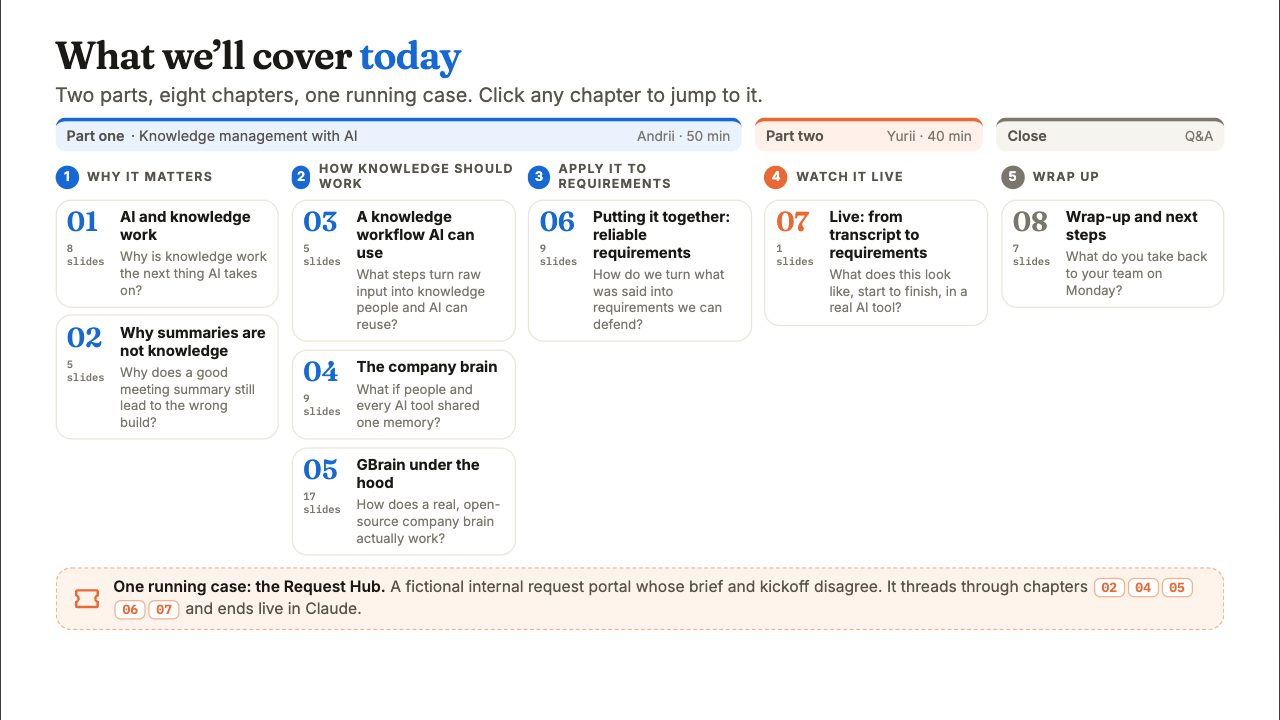
8 chapters, one case from transcript to backlog
- 01
AI and knowledge work
Three waves of generative AI and where this one lands: AI as a knowledge worker, not just a coding tool. Why knowledge work is a loop that keeps reinventing its tools, and why code is knowledge but knowledge isn't code.
- 02
Why summaries are not knowledge
A familiar failure: one meeting, three readings, and the wrong thing gets built. We meet the course case, a Request Hub whose brief and kickoff disagree, and decide what should survive a meeting beyond a fluent summary.
- 03
A knowledge workflow AI can use
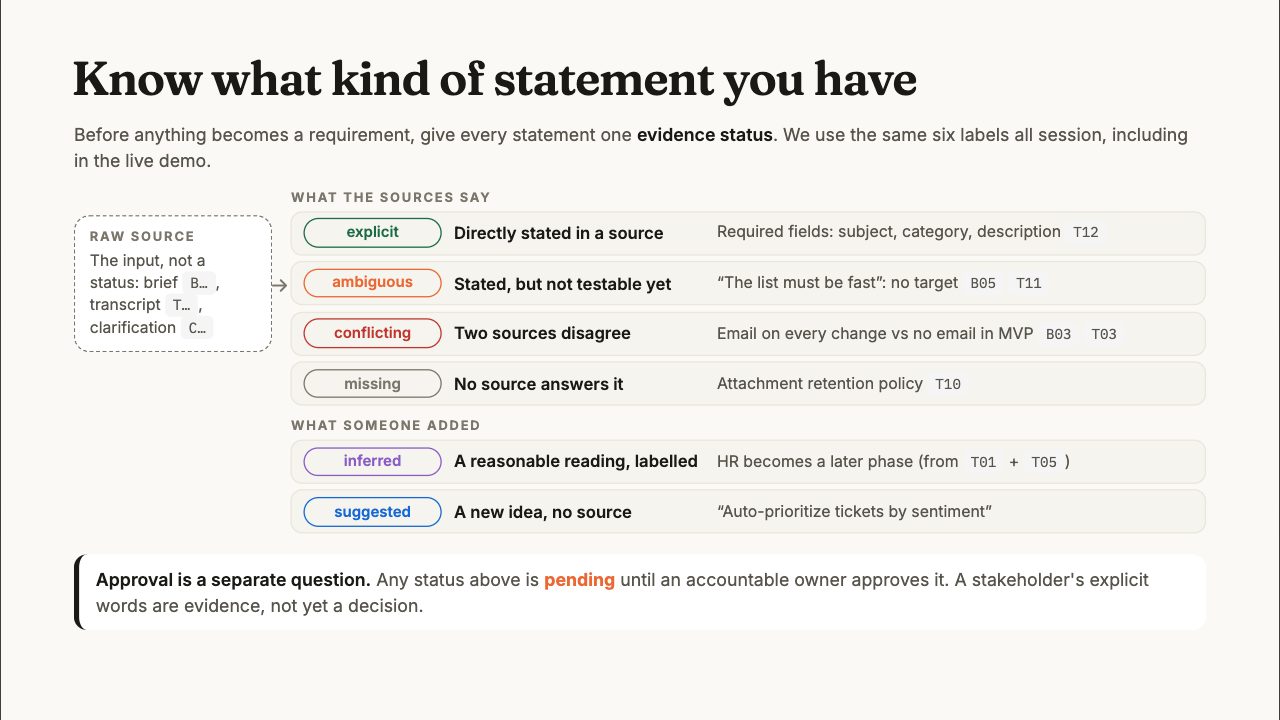
Six steps from raw input to reusable knowledge, with a human gate. Every statement gets one evidence status (explicit, ambiguous, conflicting, missing, inferred or suggested), and approval is tracked separately. Plus the minimum useful knowledge record and how a lead agent and specialists share evidence.
- 04
The company brain
Chat, project or company brain: picking the right boundary. Today every AI tool keeps its own memory; a company brain gives people and every tool one memory, kept as pages you own with the current fact on top and history below, searchable by meaning, with personal, team and company scopes.
- 05
GBrain under the hood
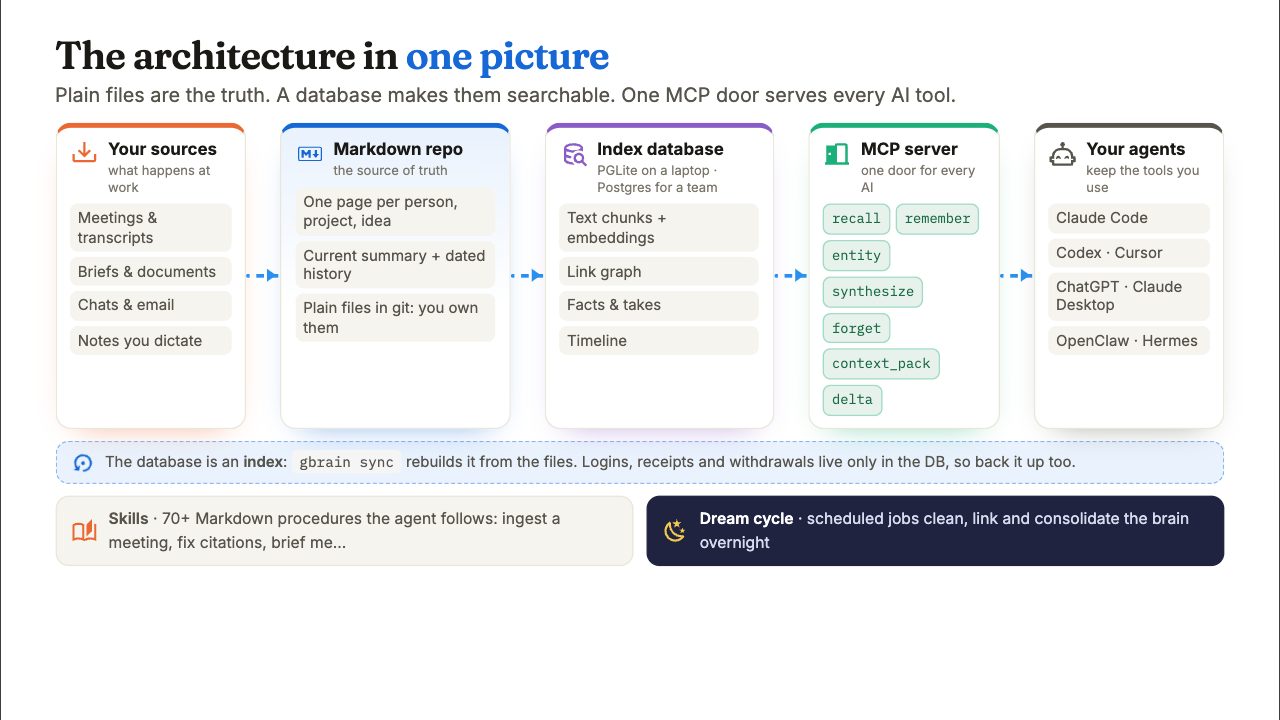
How a real, open-source company brain works: Markdown files as the source of truth, a database as the index, one MCP server for every AI tool. Read first and write back, hybrid search, a self-wiring knowledge graph, facts and takes, the overnight dream cycle, skills, and moving from a personal brain to a team brain with scoped access.
- 06
Putting it together: reliable requirements
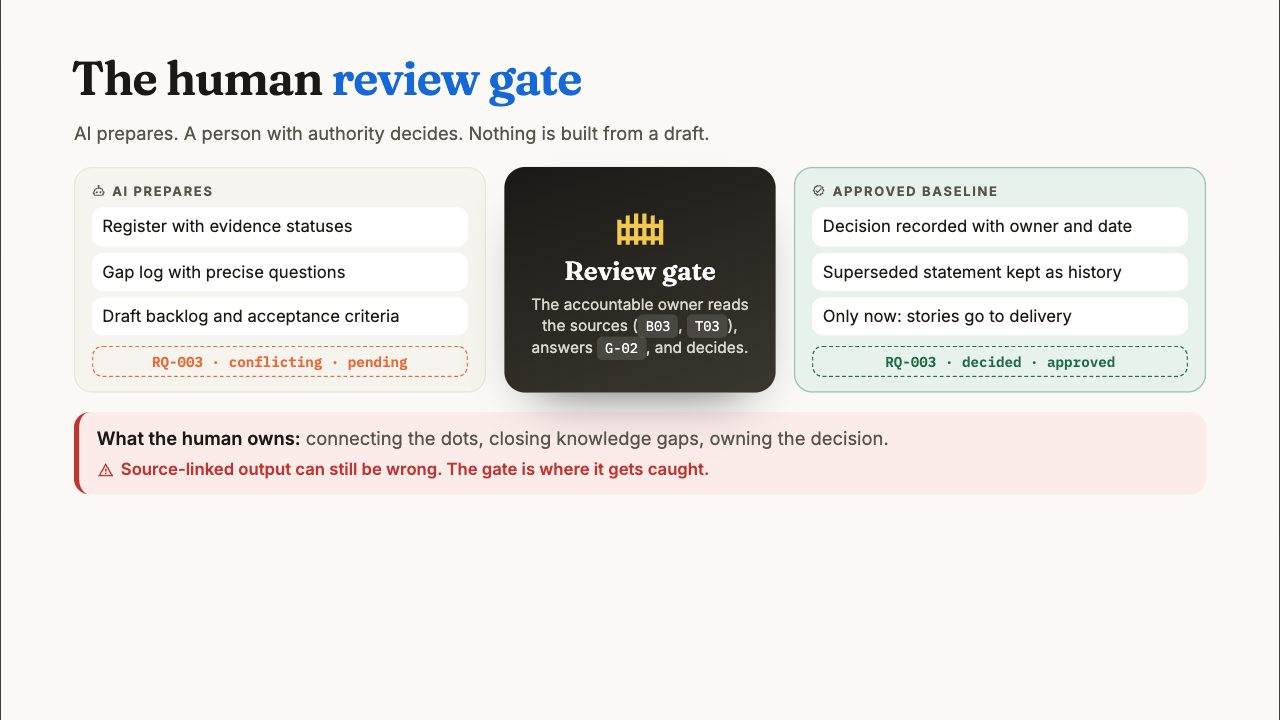
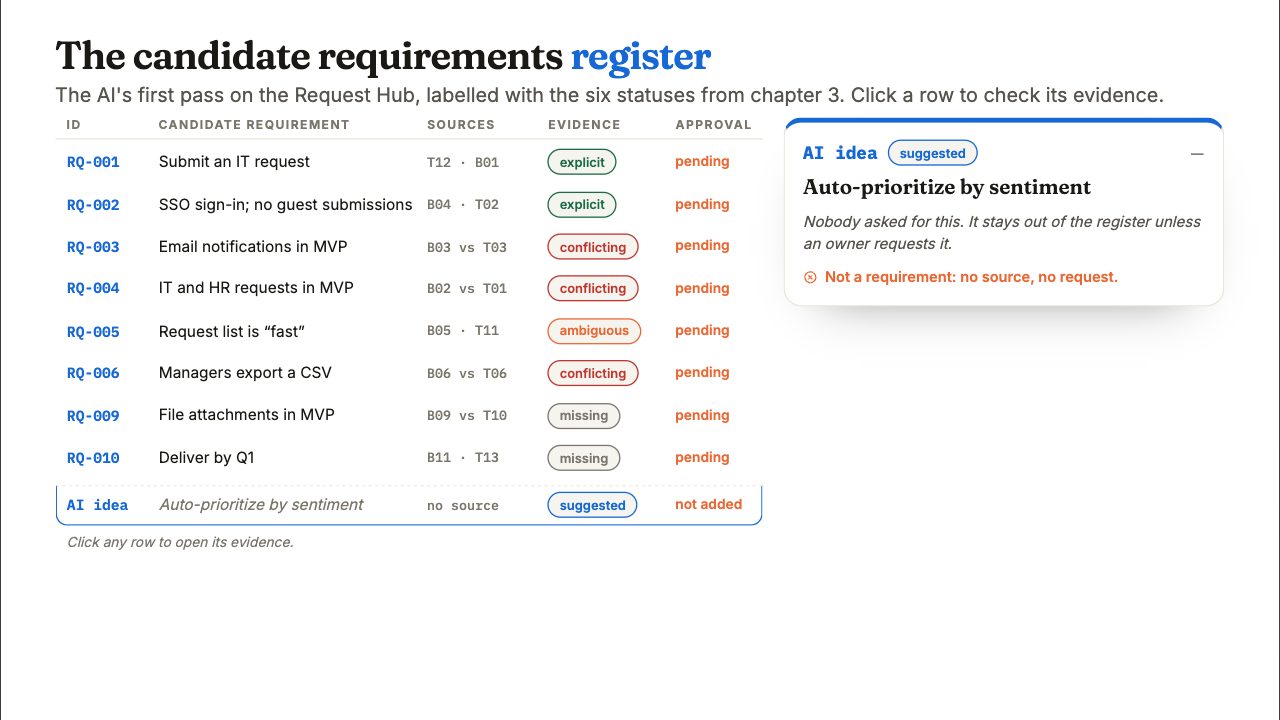
The whole pipeline from evidence to requirements in one picture. Separate the requirement layers, build a candidate requirements register, turn gaps into precise questions with named owners, and pass everything through a human review gate with traceability down to tests.
- 07
Live: from transcript to requirements
The full case run live in Claude: extract a source-linked requirements register, build a gap and conflict log with clarifying questions, draft a backlog with acceptance criteria, and hand off decisions, rationale and open issues.
- 08
Wrap-up and next steps
Learning outcomes, safety and review rules, a tools map for each workflow step, a reading, watching and course list, and four habits to try on your next requirements meeting.
Key idea
Six evidence statuses, and approval kept apart
Before anything becomes a requirement, every statement gets one evidence status. The same six labels are used throughout the course, including the live demo.
Explicit
Directly stated in a source.
Ambiguous
Stated, but not testable yet ("the list must be fast").
Conflicting
Two sources disagree.
Missing
No source answers it.
Inferred
A reasonable reading someone added, labelled as such.
Suggested
A new idea with no source.
Approval is a separate question. Any status stays pending until an accountable owner approves it. A stakeholder's explicit words are evidence, not yet a decision.
Try it next week
One real meeting, four habits
- 1
Keep the sources
Save the transcript and the brief, and give each statement an ID (T01, B01, …).
- 2
Label everything
Ask your approved AI tool for a register that gives every statement one evidence status and its source IDs. Check two rows by hand.
- 3
Turn gaps into questions
Write one precise question per conflict or missing fact, each with a named owner who can answer it.
- 4
Gate the backlog
Nothing becomes a story until its owner approves it. Keep the old version as history.
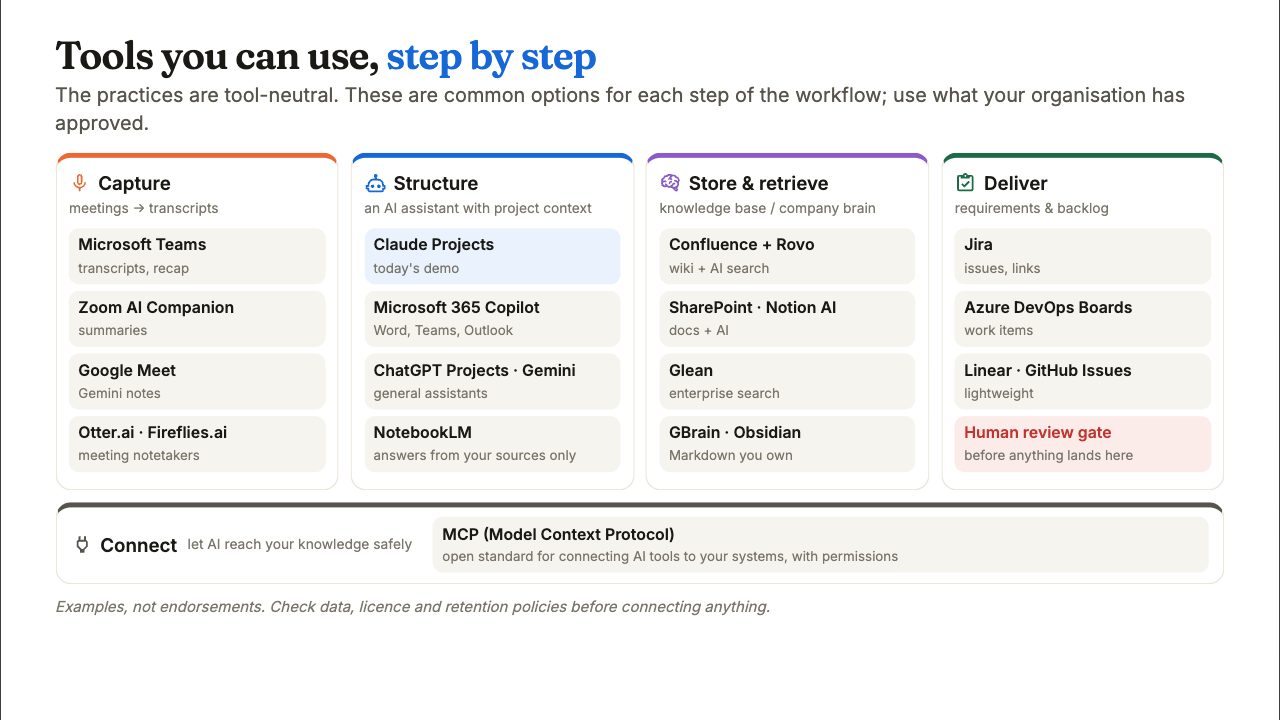
Tools for each step
The practices are tool-neutral. These are common options; use what your organisation has approved, and check data, licence and retention policies before connecting anything.
| Capture (meetings to transcripts) | Microsoft Teams, Zoom AI Companion, Google Meet, Otter.ai, Fireflies.ai |
|---|---|
| Structure (an AI assistant with project context) | Claude Projects, Microsoft 365 Copilot, ChatGPT Projects, Gemini, NotebookLM |
| Store and retrieve (knowledge base or company brain) | Confluence with Rovo, SharePoint, Notion AI, Glean, GBrain, Obsidian |
| Deliver (requirements and backlog) | Jira, Azure DevOps Boards, Linear, GitHub Issues, after the human review gate |
| Connect (let AI reach your knowledge) | MCP (Model Context Protocol), an open standard for connecting AI tools to your systems |
Keep learning
Read, watch, take a course
Read
- Building effective agents
Anthropic
- How we built our multi-agent research system
Anthropic
- Effective context engineering for AI agents
Anthropic
- What is knowledge management?
IBM Think
- Software Requirements Essentials
Karl Wiegers & Candase Hokanson
- Thin Harness, Fat Skills
Garry Tan
Watch
- Intro to Large Language Models
Andrej Karpathy
- Software Is Changing (Again)
Andrej Karpathy
- How We Build Effective Agents
Barry Zhang, Anthropic
- What's next for AI agentic workflows
Andrew Ng
Learn
- AI Fluency: Framework & Foundations
Anthropic Academy
- Get started with Microsoft 365 Copilot
Microsoft Learn
- Google AI Essentials
Google
- Agentic AI
DeepLearning.AI
FAQ
Questions about the course
Who is this course for?
Business analysts, product owners, project managers and team leads who turn conversations into requirements, and engineers who want AI agents grounded in validated project knowledge. No coding is needed.
Which AI tool do I need?
None in particular. The live demo uses Claude Projects, but the practices work in Microsoft 365 Copilot, ChatGPT, Gemini or any assistant your organisation has approved.
What is an evidence status?
A label that says how well a statement is supported: explicit, ambiguous, conflicting, missing, inferred or suggested. It is separate from approval: a stakeholder's explicit words are evidence, not yet a decision.
What is a company brain?
One shared, searchable memory for people and every AI tool, kept as pages your organisation owns, with the current fact on top and its history below. The course shows how the open-source GBrain project implements one.
How do I get the slides?
Enter your email, or the access code you received from UBOS, on this page. The slides open in your browser straight away.
Can UBOS run this course for my team?
Yes. UBOS AI Academy runs it as a live session, plus a deep-dive workshop on using the framework day to day and a technical session on grounding coding agents in the same knowledge.
Run this course with your team
UBOS AI Academy delivers it live, with a deep-dive workshop on using the framework day to day and a technical session on grounding coding agents in the same validated knowledge.